
What are Developments and Cohorts?
You can now see and manage "Developments" on our platform. A "Development" is an area within a market where we use the same architecture product across all lots. "Developments" can have multiple "Cohorts" and a "development" may span multiple years.
From within a "Development" you can also manage "Cohorts". A "Cohort" is a group of lots within a development being developed within a similar timeframe (i.e. similar project start and end dates). A cohort can have multiple projects. A "cohort" has a defined start and end date.
Key terms
|
Development |
A smaller area within a market where we use the same architecture product across all lots. A development can have multiple cohorts and a development may span multiple years. |
|
Cohort |
A group of lots within a development being developed within a similar timeframe (i.e. similar project start and end dates). A cohort can have multiple projects. A cohort has a defined start and end date. |
| Project |
A structure that is built on a specific address within a cohort with defined plans, options, scope, budget, and schedule. A lot may have more than one project on it (i.e. Main House and ADU). A project has a defined start and end date. |
Why did we do this?
With the introduction and growing relevance of our BOOL business model, it was necessary to reflect this business change in Blueprint. There has become a need to view and manage developments and organize projects within cohorts for each development. Here are a few things that you can do with this new feature.
View a list of Developments within all markets or a specific market
- Simple Click Projects and then "Developments" as shown below
- You can filter by Market if needed
Create a new Development
- In the upper right click on "Create New Development"
- Name the "Development" and assign a Market from the drop-down list then click "Create Development"
View all Cohorts within the Development
- Click into the "Development"
- See all of the "Cohorts" and if necessary use the arrows to expand or collapse the "Cohort" to see the list of projects in each "Cohort"
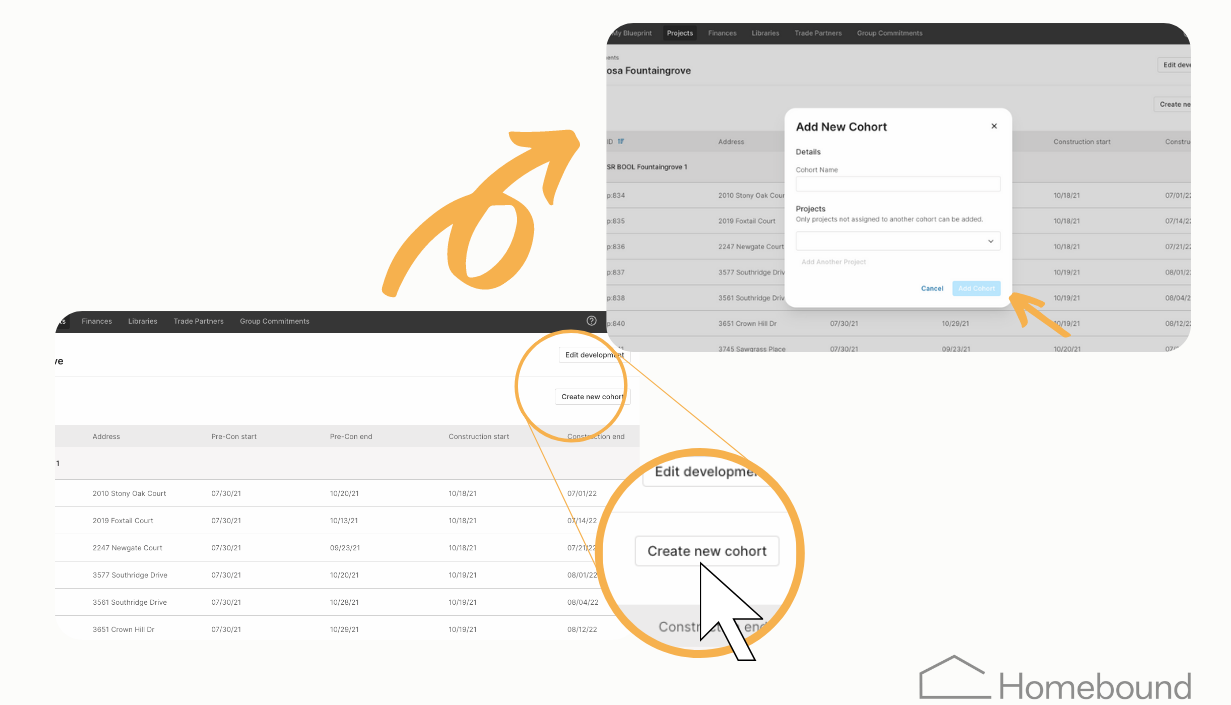
Create new Cohorts
- Click into the "Development"
- On the right Click "Create new Cohort"
- Give the "Cohort" a name
- Add "Projects"
- Then click "Add Cohort"
 __
__
Video tutorial
__
Questions? Feedback? Email us at Product-Support@Homebound.com or chat with us in Blueprint!
Comments
0 comments
Please sign in to leave a comment.